
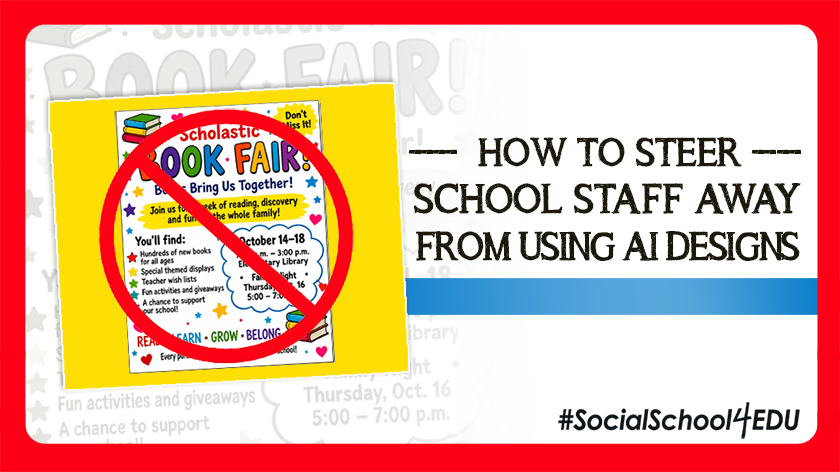
“I hope the school can learn not to rely on AI so much when making posts. You have skilled students who could easily have designed posts with the opportunity to add them to their portfolio for college.”
This is a real comment from a community member on a school district social media post. And get this: the post wasn’t even AI-generated or AI-related! It underscores the fact that people recognize AI-generated graphics, and they do not like them.
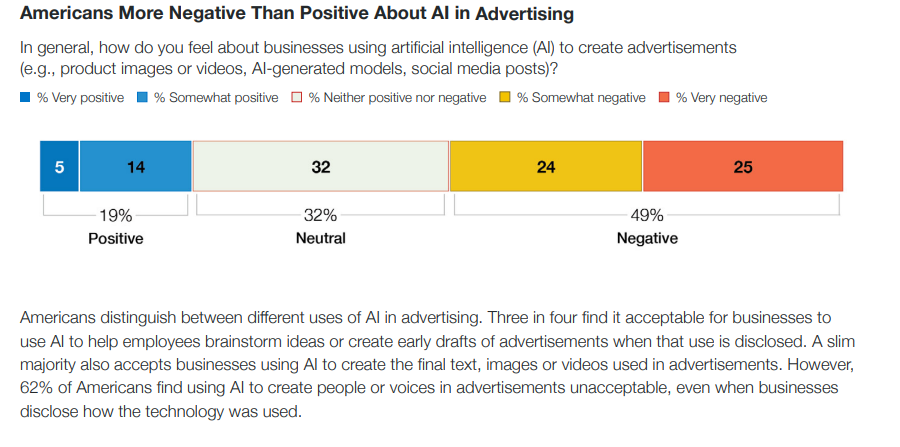
Research backs this up. According to a May 2026 Bentley-Gallup Business in Society survey (download it for free, here), “79% of Americans report seeing advertisements that appear to have been clearly created using AI in the 30 days before completing the survey, and Americans are more likely to view businesses’ use of AI to create advertisements negatively than positively, with nearly half expressing negative views.”
More findings from the study:
As school communicators, one of our biggest responsibilities is preserving our school’s reputation. And if obvious AI usage in marketing is shown to reflect negatively on the brand using it – well, why would we risk it?? After all, we want to maintain trust with our audiences, including internal stakeholders (staff, students, families) and the wider community.
So today, I want to challenge you to take a stand on AI-generated graphics for your school!
I’m going to explain why AI-generated flyers and graphics are a problem (I know, I know, I’m preaching to the choir on this!), and how you can communicate this kindly to your colleagues. I’ll also share some alternatives, including an easy Canva hack for when you do receive an AI-generated visual.
Why is it a Problem to Use AI-Generated Graphics?
You probably already read my blog, The Problem with AI-Generated Flyers, where I explained why AI-made graphics are a problem on social media. Add that to your list to read next, if you haven’t caught it!
AI-generated visuals cause a lot of problems, but here are the six main issues that I’ve seen:
- They’re hard to read on a phone
- They often look generic and unbranded
- They are crammed with details
- They trap important information in an image instead of an accessible caption
- They often include incorrect logos and photos, or photos are distorted
- They depict made-up people and mascots that don’t exist
Here’s how I put it when I was interviewed for the Mindful School Marketing Podcast:
Fixing the AI Graphic Problem (Without Hurting Staff Members’ Feelings)
Listen, I get it.
Your school librarian was really excited to send you her AI-generated graphic to advertise the book fair, and you don’t want to disappoint her.
Or the new basketball coach asked you to repost an AI-generated flyer he made for the upcoming tryouts, and you’re still building a working relationship with him and don’t want to offend him by shooting him down.
Or perhaps a school admin whipped up a visual inside an AI tool and asked you to post it across social media right away.
It’s tempting to use these submissions “just this once,” but is it worth the precedent you’re setting? You’re in charge of maintaining the school’s brand, image, and reputation, after all! And even though you have a million things on your plate today (and recreating that submitted graphic was NOT one of them), I still want you to pause.
Here’s how you could respond to one of those submissions:
As AI tools become more common, we want to be thoughtful about how AI-generated graphics and flyers are used in district communications, especially when student photos, student names, or student likenesses are involved.
AI can be helpful for brainstorming ideas, simplifying messages, or creating a first draft. However, not every AI-created flyer or graphic is ready for social media. Many flyers include too much text, small print, QR codes, or important details that are difficult to read on a mobile device.
For social media, please keep these guidelines in mind:
- Use less text on the graphic.
- Include the most important details in the post caption.
- Do not rely on a QR code in the graphic.
- Provide a direct link for families to click when needed.
- Avoid uploading student photos, student names, student work, or student information into AI tools unless the district has approved that use.
- Let us know if AI was used to create or edit the graphic.
If a flyer has too much information to be accessible or easy to read, we may recommend turning it into a simpler graphic and placing the details in the post copy instead.
Our goal is to make school information easy to read, easy to access, and easy to act on — while protecting student privacy and maintaining trust with our families.
Thank you for helping us communicate clearly and responsibly.
But I know you want to be proactive, not reactive. Have you thought about getting ahead of “the AI problem” (because maybe it’s not yet an issue at your school) by setting up some protocols and guidelines for your school staff?
Karen Vrabec, Director of Communications for Canton Local School District in Ohio, recently shared this thoughtful resource within our private membership group:
“Sharing an idea for helping staff create more effective AI-generated flyers! Like many of you, I’m seeing a lot of AI flyer fatigue. Rather than just pointing out what isn’t working, I want to help staff learn how to use AI more effectively.
I’m starting a recurring feature in our employee newsletter with visual before-and-after examples, simple design tips and prompts to help staff create cleaner, more accessible flyers that follow our district branding. And yes, I am using AI for help!
My goal is to coach and encourage, not criticize or discourage creativity. AI is a great tool, but a little guidance can make a big difference!
Thought I’d share in case anyone else is looking for a positive way to approach this!
I think a powerful suggestion for school communicators is to provide a standard design in Canva – or a couple of them – that are on brand, have some very simple fields to change up – and that will just make it easier for them.”
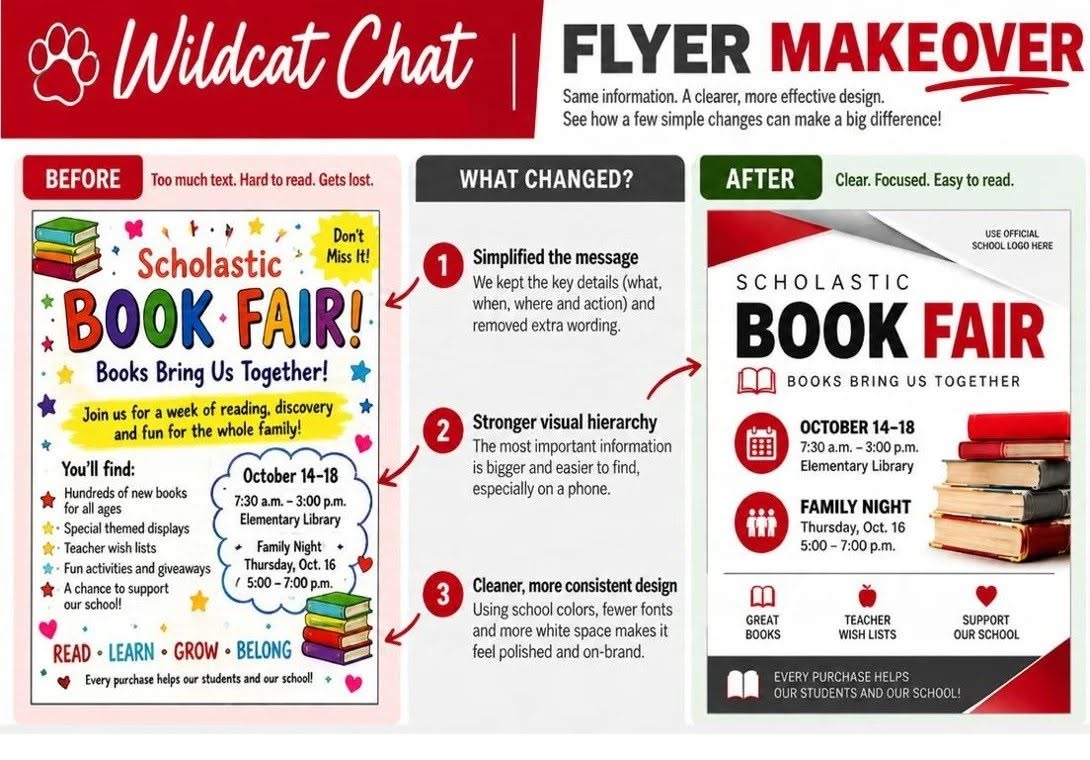
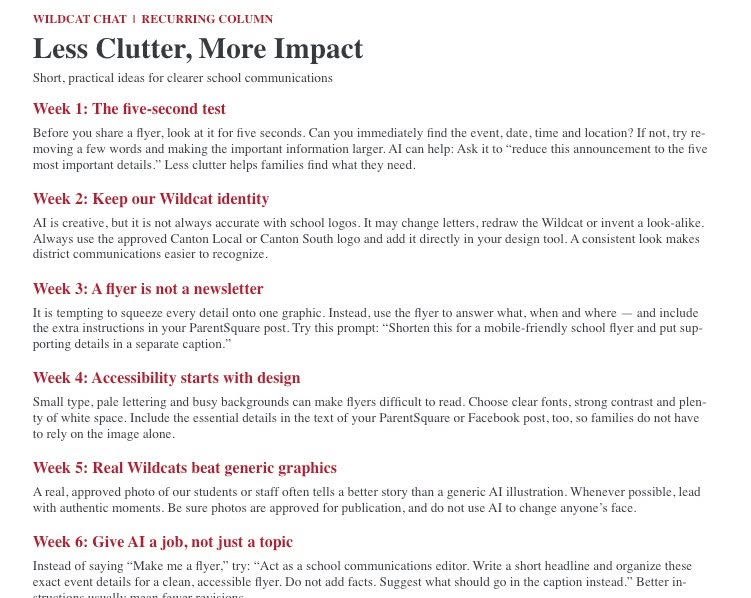
I absolutely love this perspective and examples from Karen! She’s approaching this issue from a collaborative standpoint, trying to empower and equip school staff to produce better visuals.
My Director of Membership, Melissa Marti, reacted to Karen’s “before and after” example with this valuable perspective:
I think the biggest reason to advocate for the second design here, over the first, is that the first looks like every other AI graphic out there. As a social media consumer, it’s not catching my attention as something important or relevant. But if the second one is clearly branded in my child’s school colors/logo, it will catch my attention because I want to make sure I don’t miss out on an important announcement from the school. All these crazy AI flyers with wrong school colors and messed up mascots are failing to reach the people they’re trying to reach.
Jen Bode, who works with communications and mission advancement at Arizona Lutheran Academy, also put together some helpful tools to guide her colleagues. She puts it well: “If someone knows it’s AI, you’ve failed!”
Here are the bullet points of what she sent to teachers and staff at ALA:
- ALA doesn’t use AI images on social media or its website.
- Proceed with extreme caution when publicly using images that are or resemble AI, even if it’s just for classroom use, a building flyer, or an event program.
- Students quickly recognize AI, calling it “AI slop.”
- AI-generated designs can easily be dismissed as “low effort,” which damages trust in our ALA organization.
- Lean on professional graphic designers (including current students and alumni) and use the ALA style guide when outsourcing. Designated ALA staff can also help with graphic design with a few days’ notice.
- When designing something yourself, use the ALA-provided Canva brand kit. Make sure you use the school’s brand identity (logo, fonts, colors), stick to basic details, and make sure the “who, what, when” can be quickly identified.
In her communication to staff, Jen also quoted a Tucson business owner: “To every business owner over 40, the new generation of buyers actually hates your AI flyers. They go against known conversion method theory. They don’t follow your own brand colors and typography. They communicate “Fake” because it’s easily spotted as AI. They deteriorate trust, not build it. They have far too much information on them and create decision paralysis.”
But what if you just need to use that AI graphic submission?! How do you edit it so it’s acceptable for your communications efforts?
One of my best tips is to use Canva Magic Layers. You can upload the AI design into Canva, and then strip down the elements you don’t like so it’s more on-brand and streamlined.
And reference my prior AI-flyer blog again – it has some great tips for how to use your graphic as the “hook” and saving the important details for the caption.
Your School is Unique. Don’t Let AI Take That Away!
AI isn’t going away, and I’m not here to tell you what your staff can or can’t do. But when it comes to what your community sees, your school’s reputation is on the line. As the research shows, people do notice when a visual is AI-generated – and they don’t like what they see.
So the next time someone sends you an AI-generated visual and asks, “Can you post this?”, I hope you’ll feel confident and kind in your response. Special thanks to Karen Vrabec and Jen Bode for sharing their thoughtful ideas and resources!