
If you’re a school communicator post-pandemic, you already know the K12 education landscape has drastically changed. Families have more choices than ever, and in some states, taxpayer dollars are literally funding students to go anywhere they want! Public schools, charter schools, private schools, micro schools… the competition is real, and it’s fierce.
So how do you stand out? How do you reach families who don’t even know what you have to offer? And how do you do it without a massive marketing budget?
The answer could be targeted digital advertising.

Emily Jones, Marketing and Communications Specialist at Fort Wayne Community Schools
Emily Jones, Marketing and Communications Specialist at the largest district in Indiana, Fort Wayne Community Schools, has been on the front lines of this challenge since 2023. Her district operates in a school-voucher state in which taxpayer money is used to fund students who attend private schools. And starting with the 2026/2027 school year, income limits will be gone, meaning the school choice program will be universal for all Indiana students.
What a challenging environment to work in!
But thanks to her prior advertising experience, Emily has leaned into paid digital ads to showcase what FWCS has to offer – and it’s working. In our membership program, she recently led a fantastic webinar to share all her tips and tricks, helping our members implement paid advertising programs at their own school (regardless of public, private, or independent!)
In today’s blog, you’ll learn exactly how FWCS uses social media ads, Google search retargeting, and geofencing to successfully engage its community. Discover the research, the best practices, and the metrics that prove it could be worth trying for your school!
You don’t need a massive budget to get started. You don’t need to be a marketing expert. You just need to be willing to try, learn, and adjust along the way. Whether you have $25 or $2,500 to spend, this is your roadmap to reaching new families, one click at a time. Let’s dive in!
Best Practices Before You Begin
Before you even dip your toes into digital advertising, it’s important to have a solid, consistent content strategy for your organic social media, website, and Google profile(s). Broken links, incomplete profiles, and sporadic posting aren’t doing you any favors. It’s not worth investing in digital advertising until you have a solid foundation in place.
As Emily notes: “If these are not maintained, you have nowhere to send your potential students and staff! The more active you are with your regular organic posts, the better your paid posts are going to do.”
Are you worried about cost? Before you write off the idea of digital advertising because you think it’s too pricey, I have good news for you! You can make digital ads work even with small budgets. For as little as $15, you can test a boosted post and learn what works.
You could also try redirecting budget dollars from other places – for example, in many cases, digital ads are more cost-effective than print ad campaigns.
Emily shared another brilliant tip for people who are new to digital ads:
“If you see something that is working for another industry or another school, find a way to make it work for you. All art is derivative, and so is advertising.”
Look at what’s working in other industries, other schools, and other campaigns, then adapt it to fit your community. So start saving screenshots of ads to your phone, look up articles about successful ad campaigns, and check out what other schools are doing. Inside my membership program, we constantly share about posts and campaigns that are doing well, so that’s a great place to start if you’re ready to “admire and acquire!”
Step 1: Do Your Research
Once your organic platforms are solid, you’ve secured some budget dollars, and you have a list of other ads for inspiration – you’re ready to start designing your own digital ad campaign! Here are the questions Emily recommends you ask yourself during the research phase:
Who are your competitors?
“Knowing who your competitors are will help you fine-tune which tactic is going to be best and what it is that you’re advertising. Who are your biggest competitors? Are you a private school? Are public schools your biggest competitor? What are you looking to change? Are you a charter school?”
What is the biggest problem that we need to solve?
“Identify locations where your enrollment is down, you have extra space, and/or you have a new program you need to fill.”
How will you actually execute your digital ad strategy?
Digital advertising doesn’t have to be overwhelming or expensive. It just requires a willingness to learn, adapt, and test what works best for your school community. Emily breaks down three main approaches that you could pursue:
Option 1: Hire an agency or work with local media buyers
Agencies can handle the heavy lifting, but they often come with bigger price tags. However, don’t overlook your local TV and radio stations! Many have digital media buyers on staff who offer smaller, more affordable packages tailored to different budgets.
Emily recommends asking: “I’ve got this much to spend. Are you able to help me out with that?” You might be surprised by what’s available, especially if they offer nonprofit or education-sector discounts.
Option 2: Do it yourself
Platforms like Meta (Facebook/Instagram) and Google allow you to set your own budget, create ads, and track performance. There will likely be a learning curve, especially since platforms update frequently, but Emily recommends looking up online tutorials to help.
Option 3: Combine both approaches
This hybrid model lets you test the waters with an agency while also experimenting on your own. Start with a small package from a local media partner to get familiar with the process and metrics, then try running a few campaigns yourself.
Over time, you’ll learn what does (and doesn’t) resonate with your audience. It’s all about trial and error!
Step 2: Define Your Target Audience
Narrowing down your target audience probably started in the prior phase, as you researched your advertising priorities, but now it’s time to really hone in on who you want to reach. This might mean collaborating with other teams in your district! Figuring out your primary audience(s) will help you get the best bang for your buck when you start running digital ads.
Are there specific zip codes or neighborhoods you need to attract? What languages are spoken in their homes? What time of year do they make enrollment decisions? Which factors influence their decisions? Which social media platforms do they use? Who is the education decision-maker in a household? You may think it’s always parents/guardians, but Emily discovered that grandparents were a key target audience for some of FWCS’s ads!
Maybe you have a brand new school or program that needs to be filled. Perhaps you’re losing students at a certain grade level that you need to target for retention. Or maybe, like many schools, you get the best results by attracting preschool/kindergarten families and then keeping them for the rest of their educational journey.
Once you have a target audience nailed down, find out what kinds of ads they are typically receiving from other schools. As Emily explains:
“Find someone who is in the demographic you are targeting and have them start searching for schools to find out what ads they get served when they search or browse social media. Have them send you screenshots! It’s really great if you can find a guinea pig within your friends or colleagues that can watch for these things so that you can see what they’re seeing and know what’s happening.”
Step 3: Pick Your Paid Channels
Once you know who you’re trying to reach, it’s time to choose the right channels to deliver your message. Each paid channel serves a different purpose, and the best strategy often involves using more than one. Emily uses three primary paid advertising channels, each with its own strengths and strategic purposes.
Social Media Ads
Social media helps you build awareness and engage specific demographics. Platforms like Facebook and Instagram allow you to get incredibly specific with your targeting. You can narrow your audience by zip code, age, language, interests, income level, and more. FWCS uses social media ads to reach incoming pre-K families, the Hispanic community, and families who might be considering its Virtual Academy.
Search Retargeting (Google Ads)
The beauty of using Google search retargeting is that you will catch families who are actively looking for schools. Search retargeting ensures your school’s website pops up at the top of Google search results. This works by creating a list of keywords that trigger your ads.
Emily’s team has learned a lot through trial and error, identifying and then leveraging keywords that increased traffic to the district website.
“We used to have many different variations of keywords – like ‘Montessori,’ ‘Montessori FWCS,’ and all kinds of combinations. But Google’s algorithm has changed, and now it does a lot of that matching for you.”
Her advice is to keep your keyword list simple and curated, and review it quarterly to make sure it’s still performing the way you want. Google’s tools can show you what people are searching for, helping you refine your approach over time.
Geofenced Digital Marketing
Geofencing is a game-changer for hyper-local targeting. With this tactic, ads are served to anyone within a specific geographic area, like a particular neighborhood, near a competitor’s school, or around community gathering spots.
Emily used geofencing for her Burmese and Hispanic family pre-K campaigns. She identified local grocery stores, temples, and daycare centers where their target families spend time, then “fenced” those locations digitally. When someone in that area opened Facebook, browsed a news site, or used Google, they’d see FWCS’s ads in their language.
FWCS even paired this digital strategy with boots-on-the-ground efforts, dropping off flyers and posters at the same locations that were geofenced. That way, families saw the message in print and online, reinforcing awareness and trust.
Bonus Advice Regarding Social Media Advertising
We’re a social media company, so of course we need to go deeper on social media ads! Social media advertising offers incredible flexibility, but it can also feel overwhelming if you don’t know where to start.
The good news is that there are really just a few main types of ads to understand, and each serves a different purpose. Your goals will help you determine which ad type to pick.
Conversion Ads
Conversion ads are all about action. These ads include a clear call-to-action button (like “Learn More,” “Register Now,” or “Get Started”) that takes users directly to your website, a registration page, or wherever you want them to go.
Facebook and Instagram’s algorithms will identify users within your targeted demographic who are more likely to click an ad, and serve your ad to them. If your goal is to drive traffic or get people to take a specific next step, conversion ads are your best bet.
General Awareness Ads
Sometimes, you just need people to know you exist. This is “top of the funnel” in marketing. General awareness ads prioritize views over clicks. The platform will serve your ad to as many people as possible (often multiple times) so your message stays top of mind. Your ad’s click-through-rate is not as important.
Emily explains it this way: “In advertising, they say you have to see something multiple times before you actually take action. With general awareness, you’re just trying to get it in front of people so they hopefully make that next step.”
These ads can still include a link, but the focus is on visibility, not immediate conversion.
Boosted Event Posts
If you’re hosting an event like a kindergarten open house or a STEM night, boosted event posts are a simple, effective way to get the word out.
Simply create a Facebook event (which acts like a digital flyer and calendar reminder), and then pay to boost it so more people see it. The beauty of this approach is that your event can be shown to people who aren’t even following your page, as long as they’re in your target area or demographic!
Emily shared a great example: “For $15, I was able to get about a thousand extra eyeballs on a STEM event. I targeted the neighborhood around our school, and it gave me a lot of options to get it right to the people who needed to see it most.”
Lead Generation Ads
Lead generation ads are a newer tactic Emily has added to her toolkit – and they’re working, especially for people interested in the new virtual school and FWCS’s kindergarten program.
When someone clicks the ad, a form pops up (built right into Meta) where they can enter their name, email, and phone number. They are opting into receiving more information about the school or program that you’re advertising. Those warm leads go directly into your Meta inbox, and your team can follow up with phone calls or emails.
Emily’s kindergarten campaign generated 38 leads in just a month and a half. “Not all of them were ready – some had two-year-olds and were just planning ahead – but it can turn into real people pretty fast. And it’s not a space that a lot of schools are using yet.”
With lead generation ads, you don’t need a separate landing page or complicated tech setup. It all happens within the platform, making it accessible even for a small school communications team!
Step 4: Track Your Ad Metrics
One of the biggest advantages of digital advertising over traditional marketing is the data!
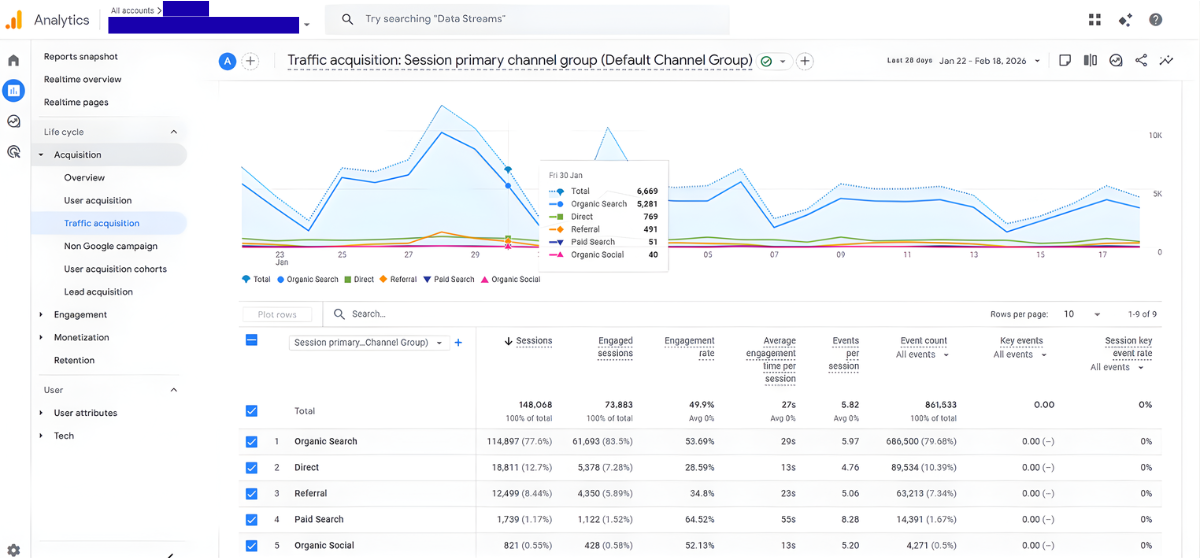
Emily puts it perfectly: “You don’t know how many people have driven by your billboard or how many people have opened up your annual report. You don’t know how your print ads are working unless you hear somebody talking about it. But with digital advertising, you can see the reaction to your work in seconds.”
That measurable data can be a lifesaver when budgets are tight and you need to prove ROI.
“Having easy-to-understand data can save your job in a troubling economy. A lot of what we do in social media and digital advertising can be proven with data, unlike print and other marketing.”
You can easily evaluate the effectiveness of your digital ads with these key metrics:
Click-Through Rate (CTR)
CTR measures the percentage of people who clicked the link in your ad. It tells you how compelling your call-to-action was and whether your audience is taking the next step. A higher CTR means your ad is resonating and driving action.
Impressions
Impressions show how many times your ad was displayed to users, even if the same person saw it multiple times. This metric is especially important for general awareness campaigns, where the goal is to keep your school top-of-mind rather than drive immediate clicks. Remember, people often need to see a message several times before they take action.
Average Cost Per Click (CPC)
CPC tells you how much each click on your ad costs. Industry averages hover around $2.32 for Google search ads and $1.72 for Facebook ads. But Emily’s ads generally average below that because the ad space isn’t as crowded in FWCS’s market. In general, schools face less competition in the digital ad space, which can mean lower costs and better results.
Keep in mind that CPC fluctuates based on timing and competition. Election cycles, holidays, and back-to-school season can all drive prices up. But if you’re advertising during slower periods (like summer registration windows) you might snag a bargain.
Tips for Setting Your Digital Ad Budget
Worried about overspending? Platforms like Meta allow you to set your total budget upfront. Emily explains: “There are sliders where you can either set what you want to spend per click or you can set your complete budget and say, ‘I want to spend $50 on this,’ and it will get you as much as it can.”
The platform will estimate your reach and cost per click, then automatically adjust based on performance and your budget cap. If competition is higher than expected, you may get fewer impressions or clicks – but you won’t spend more than you authorized.
For Google Ads, the platform will suggest what it thinks you should spend per/day based on the goals you identify in your profile when you set it up. It will give you three budget examples and a custom one you set yourself.
If you think what Google recommends is too high or low, you can go right to the custom option and enter a dollar amount to see what Google predicts it can do for you at that price, similar to the Facebook slider. While the predicted results are not guaranteed, it is a good way to estimate what it can do for you. You also have options to set monthly limits or campaign-based limits for something like a limited-time event or your registration season.
Don’t be Afraid to Try Something New!
Digital advertising has been a game-changer for FWCS. Emily’s efforts have helped increase enrollment, spread awareness about specialized programs, and reach families who might never have known what the district had to offer. And while every market is different, Emily’s success proves that this strategy is worth considering, especially if you’re trying to reach new audiences or fill open seats.
Here’s what makes digital advertising especially powerful for schools right now:
- 50% of Google users are aged 18-34, which is the exact demographic most likely to be searching for schools for their young children.
- The largest demographic of Facebook & Instagram users is aged 25-34. These are often parents and guardians of school-aged kids, especially preschool/kindergarten.
Of course, other platforms like TikTok, YouTube, and LinkedIn also offer advertising opportunities! Your school’s accounts on these channels could be leveraged for employment campaigns or reaching younger parent demographics.
Do you feel empowered? I sure hope so! Go ahead and dive into digital ads for your school, and email me with your results! I can’t wait to celebrate alongside you.