

AI can be a huge help for school communicators. It can help you get past a blank screen, organize your thoughts, and draft captions when time is tight.
But AI also has habits.
When those habits go unchecked, social media posts can start to sound:
- Polished, but generic.
- Professional, but not quite natural.
- Obviously AI-generated.
Don’t lose what makes your school special! The goal isn’t to stop using AI. The goal is to use it intentionally, and then edit with a human touch so your posts connect with your community and reflect your school’s voice.
Let’s confront some of the most common AI “tells” to watch for – and show you how to fix them.
Common AI “Tells” in School Social Media Posts
1. The Em Dash—it’s everywhere!
That long dash “—” is called an em dash, and AI loves it. A lot. It’s often used repeatedly in a single caption, typically without spaces. In addition to being overused, the em dash waves an obvious AI flag because most people can’t type one directly in social media posts; it usually has to be copied and pasted.
What to do: We recommend avoiding using em dashes in your social media posts. Often, em dashes can be replaced with commas or shorter sentences. If you want to use a dash, use a simple hyphen (-). It looks more natural on social media.
2. Generic Sentence Structure
AI relies on familiar sentence templates like:
- “From classrooms to communities…”
- “From the first bell to the final dismissal…”
These kinds of phrases might sound polished, but they’re instantly recognizable as AI patterns.
What to do: Skip the prepositional phrase altogether and get right to the point. Followers scroll quickly on social media, and you only have a few words to hook them. Lead with the action, the result, or why the moment mattered, and catch their attention right away.
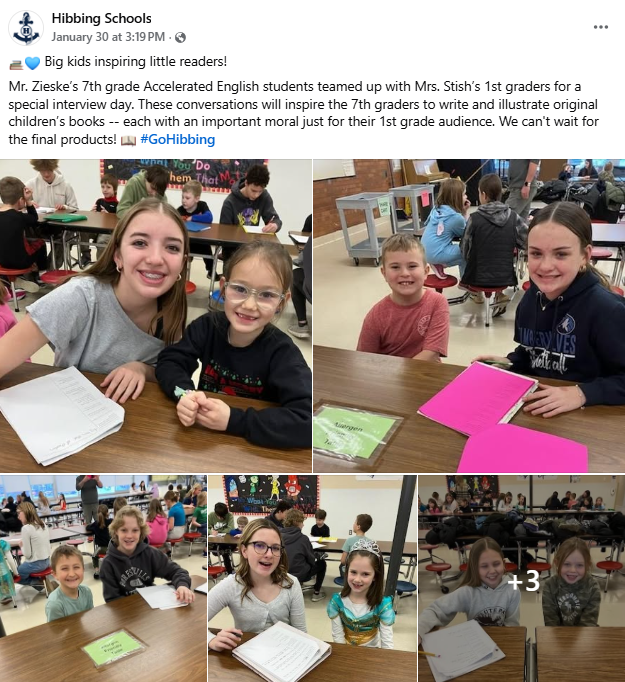
3. Perfectly Balanced Lists & Sentence Structure
“Creativity, resilience, dedication, and passion.”
AI loves symmetry and often writes in patterns, using repetitive lists, all short, punchy sentences, or all long, winding sentences packed with commas.
What to do: Vary the rhythm. Shorten the list. Combine ideas. Mix sentence lengths. Real writing has variety.
4. Over-the-Top Enthusiasm
“We couldn’t be more excited…”
“This incredible moment is a true testament to…”
It’s not wrong, but it can feel exaggerated and impersonal.
What to do: Dial it back. One sincere sentence usually lands better than three glowing ones!
5. Emoji Overload (or unusual emoji choices)
AI often overuses emojis – or chooses ones most people wouldn’t naturally pick for school social media posts.
Think: ✨📚🚀🌟🎉💡 all in one caption – or oddly specific emojis that feel more decorative than intentional. If the emojis feel random or over the top, they probably are.
What to do: Use emojis the way real people do! Stick to familiar, commonly-used emojis. We love using colored hearts that match the school colors! Also, less is more. Make sure the emoji actually adds meaning, not just decoration.
6. Formal Transitions that Don’t Fit Social Media
Words like “Moreover,” “Indeed,” or “In today’s ever-changing world” show up frequently in AI drafts, but are rarely used in real-life conversation.
What to do: Read the post out loud. If it reads like a speech rather than a conversation, rewrite it.
7. Missing Local Voice
This is often the biggest giveaway. If a caption could be posted by any school and no one would notice, it probably needs editing.
What to do: Add what AI can’t know: traditions, grade levels, staff names, inside references, or small moments from the day.
Before & After: Turning AI Drafts into Human Posts
AI drafts aren’t usually bad; they’re just unfinished. The examples below show how a few small edits can turn a polished but generic caption into something that sounds more natural, more specific, and more like it came from a real person who was actually there.
- Before: “From the first bell to the final applause, our students showcased their creativity, determination, and teamwork — 🎉✨ this is what makes our school community truly special! 🌟”
- After: “The gym was full of energy as our students showcased their creativity, determination, and teamwork! 🎉 Our annual Service Day was so special for our school community. Bravo, Panthers!👏”
- Before: “This achievement is a testament to the perseverance and excellence demonstrated by our students. 🚀📚💡”
- After: “Winning second place at the math competition didn’t happen by accident. It took practice, persistence, and a lot of effort – and our students should be proud of the work they put in! ❤️”
- Before: “💙🍎 Teachers are the heart of our schools, and today we celebrate the incredible dedication and passion of our outstanding staff! ✨👏”
- After: “Today we took time to say thank you to our Lake Harrison School staff. Their dedication and passion make a difference in our students’ lives every day! 💜 #TeacherAppreciationDay”
Prompts That Help AI Sound More Human
One of the easiest ways to avoid AI “tells” is to tell your AI tool exactly what you want changed. The best captions usually come from two or three rounds of prompting, not the first draft.
If you have a custom GPT for your social media posts, you can include these prompts right into your custom instructions so you don’t have to worry about things like the pesky em dash or too many emojis at all. Otherwise, use these prompts as needed to guide your AI:
- “Rewrite this without using an em dash.”
- “Remove or reduce emojis.”
- “Revise this caption to sound more natural and less polished.”
- “This sounds too formal. Rewrite it as a real person would post on social media.”
- “Remove generic phrases and clichés.”
- “Break this into shorter, more natural sentences.”
- “Give this a human touch.”
The Bottom Line
AI can help you draft, brainstorm, and get unstuck, but your community follows your channels for your perspective, context, and voice.
✅ Use AI to get started.
✅ Edit like a human.
✅ Add the local details AI could never know.
That’s where authentic school storytelling still lives!
Want to go deeper into the topic of AI for school communication? I’ve interviewed many outstanding guests on my podcast and written several blogs all about AI!
Here’s your “what’s next” reading/listening list:
- How to Use AI in Your Role As a School Communicator with Rebecca Bultsma
- ChatGPT Part 1: Enhancing School Communications with ChatGPT: A Powerful Tool for Productivity
- ChatGPT Part 2: Do’s & Don’ts for School PR Pros!
- ChatGPT Part 3: 26 ChatGPT Prompts for School Communicators
- Boosting Social Impact with Repurposed Content & AI Magic with Kimberly Garcia
- Level Up Your Social Media Game with ChatGPT with Heather Kilgore