The hottest topic in school communications right now isn’t Instagram Reels or crisis management. It’s digital accessibility!
Digital accessibility means every person can access the information your school distributes, regardless of ability, language, device, or learning style. And the reason this topic is so top-of-mind is the new accessibility requirements for digital content – including social media – that will soon be enforced for all local and state governments, which means public schools also need to comply.
Writing and distributing communications obviously make up a large part of what you do as a school communications professional, so these new standards may already be affecting your daily work. Ignoring the rules could put your school at risk for an OCR complaint.
So the big question is: Are you confident in your ability to write for accessibility? What about everyone else who creates content in your district? Are they well-prepared?
If you can’t say “yes” to these questions with 100% certainty, keep reading for a free resource that will help you (and everyone else in your district) create school communications that are accessible to all.
 Need more support? This blog covers digital accessibility standards that are specific to school social media. You’ll even find step-by-step video tutorials to show you how to add alt text to images, create more accessible graphics, and more!
17 Ways to Write for Accessibility
Your mission as a school communicator is to write so that anyone – a brand-new family, a person using a screen reader, or someone reading in their second language – can understand it on their first read, on their phone, and while distracted in the pickup line!
My latest downloadable cheat sheet will help you achieve this mission. It includes tips for writing accessible content for websites, social media posts, newsletters, emails, and more! It’s perfect for sending to everyone else in your district who creates content.
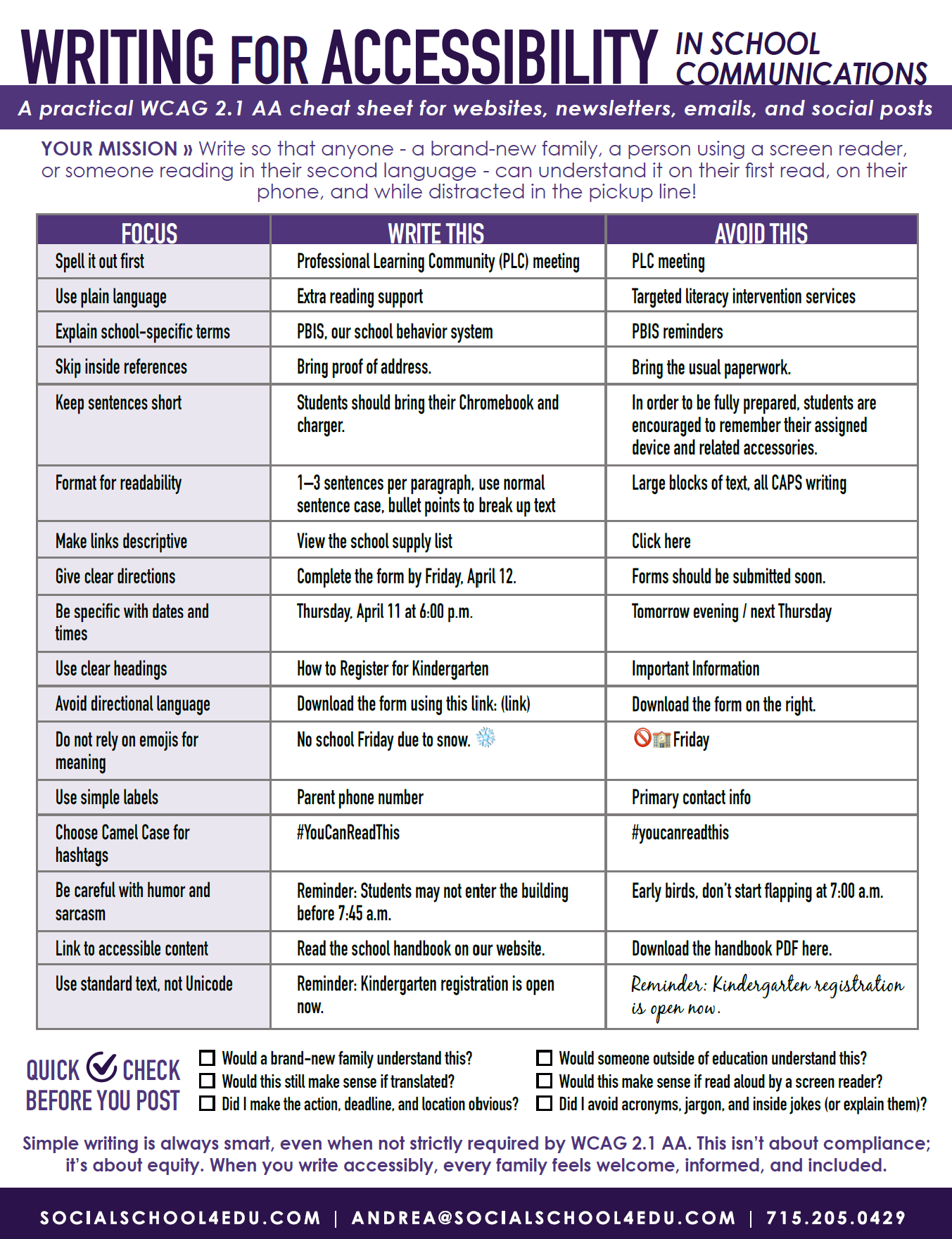
To make it extra easy, I’ve included not just the rules, but “do” and “don’t” examples for each one. Here’s a preview:
Example 1
Focus
Format for readability
Write This
1–3 sentences per paragraph, use normal sentence case, bullet points to break up text
Avoid This
Large blocks of text, all CAPS writing
Example 2
Focus
Do not rely on emojis for meaning
Write This
No school Friday due to snow. ❄
Avoid This
🚫🏫 Friday
Example 3
Focus
Use plain language
Write This
Extra reading support
Avoid This
Targeted literacy intervention services
See what I mean? It’s important to not only get a handle on the principles behind digital accessibility rules, but also to understand how to put those rules into practice. If you’re anything like me, having handy “do” and “don’t” examples are incredibly helpful.
Simple writing is always smart, even when not strictly required by WCAG 2.1 AA. This isn’t about compliance; it’s about equity. When you write accessibly, every family feels welcome, informed, and included!
Download the Full List Here